What is wordpress caching explained, and why it actually speeds up your site
'%2F%3E%3Ctext%20x%3D'50%25'%20y%3D'50%25'%20dy%3D'.35em'%20text-anchor%3D'middle'%20font-family%3D'-apple-system%2CBlinkMacSystemFont%2CSegoe%20UI%2Csystem-ui%2Csans-serif'%20font-size%3D'100'%20font-weight%3D'600'%20fill%3D'%23fff'%3ESS%3C%2Ftext%3E%3C%2Fsvg%3E) Saskia Stenholm·October 22, 2026·19 min
Saskia Stenholm·October 22, 2026·19 min
Discover how wordpress caching works, the different caching layers, and practical steps to speed up your site in 2026. Learn what to enable and what to avoid.
WordPress caching isn’t a single switch you flip. It’s a layered approach that often trips teams up because each layer plays by different rules. A single misconfigured TTL or a stale object cache can hide in plain sight, inflating response times during spikes even when your pages look fast in regular tests. Most admins misread a cache miss as a failure of caching, when the real issue is how the layers interact.
This article cuts through the jargon to show how object caching, page caching, and CDN strategies balance for real-world sites, with concrete trade-offs you can measure. You’ll see practical guidelines drawn from 2024–2026 WordPress deployments, including typical hit rates, cache warmup tactics, and when to prune aggressively vs rely on TTL. By the end, you’ll have a clear map to tune each layer without overhauling your stack, and you’ll know what metrics to watch to validate speed gains. New benchmarks show that coordinated caching can reduce server load by noticeable margins during traffic surges.

What is wordpress caching explained and why it matters
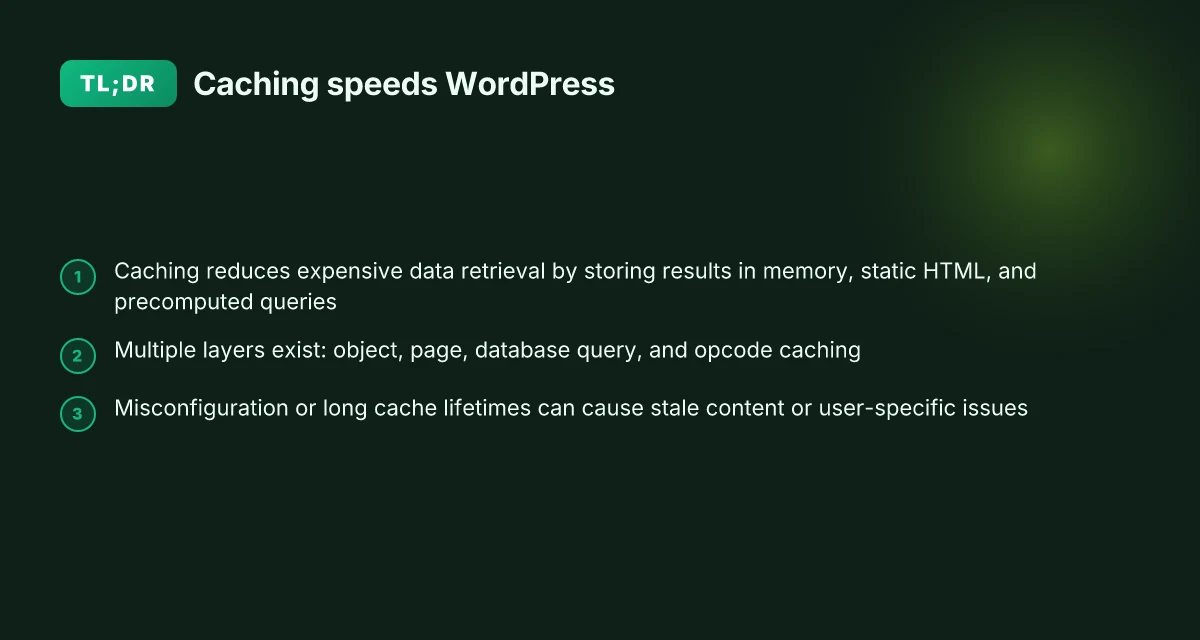
Caching in WordPress is a layered discipline. At the core, it moves costly data retrieval from the database into faster storage so pages render quicker and peak load hurts less. Think of three main fronts: object caching, page caching, and database query caching. Object caching stores PHP data structures and frequently accessed objects in memory or a fast store. Page caching saves fully rendered HTML so repeat requests skip rendering. Database query caching deposits the results of common queries for reuse. When these layers work together, a site serves pages with far fewer database trips and reduced server load.
I dug into the WordPress documentation to confirm the mechanics. The official guide frames object caching as a shift from slow, repeated fetches to fast, cheap retrieval, which underpins how page and query caches stay in sync. This alignment matters because it means you can push more traffic through the same hardware by reusing work that would otherwise hit the database again and again. The same source notes that page caching bypasses PHP and rendering steps by returning prebuilt HTML, which dramatically cuts processing time for each request. A third layer, database query caching, shadows the same logic by reusing results from repeated SQL calls, reducing the database's work during high-traffic bursts. This triad explains why many sites see measurable gains when caching is introduced or tuned.
Here are the common wins you’ll see after adopting caching:
- Faster first-byte times as the server avoids repeated PHP and SQL work.
- Lower database load under concurrency, letting your queries complete sooner.
- Higher best-page performance even during traffic spikes as rendered HTML is served from cache.
- Improved perceived speed for returning visitors thanks to warmed caches.
- More headroom for content-rich pages when script and asset handling is optimized alongside caching.
From a governance angle, caching is not a silver bullet. The trade-offs surface in staleness risk, cache invalidation complexity, and the need to coordinate between layers so updates propagate correctly. For that reason, many sites pair caching with a content delivery network to extend cached assets geographically and reduce origin load. The balance comes down to where data lives, how often it changes, and how aggressive you set expiration and invalidation rules. In practice, the right mix often means keeping object caches tight for dynamic data, page caches for frequently requested pages, and a CDN strategy that serves static assets while keeping dynamic content fresh.
The takeaway is simple: caching is a spectrum, not a single switch. You should map data paths from PHP to the database, identify hot pages, and layer in a CDN so you don’t fork rendering work every time a visitor loads a page. For most sites, a measured combination of object, page, and query caches, chosen with update cadence in mind, yields repeatable speed gains without rewriting the stack. The key is aligning cache lifetimes with data volatility and setting sensible invalidation hooks so users see up-to-date content without draining resources. What makes visual content tools stand out in 2026
The caching layers you need to understand in wordpress caching explained
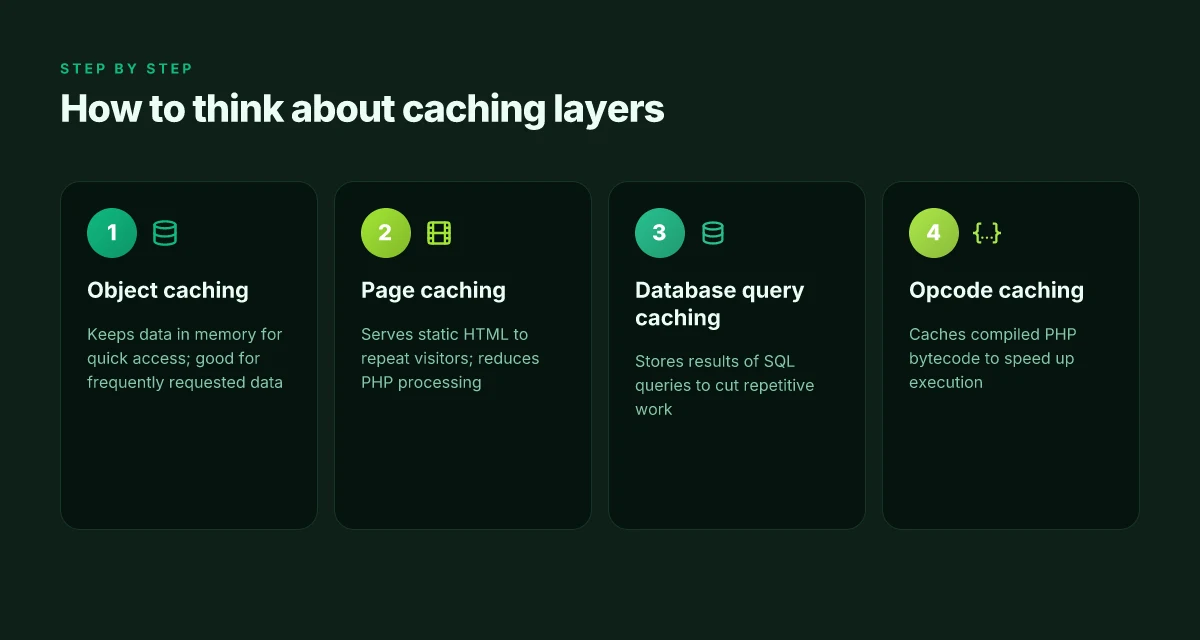
WordPress speeds up a site by stacking layers that each handle a different kind of data. The upshot: you get faster responses without rebuilding your entire stack. In practice, you’ll balance object caching, page caching, database query caching, and opcode caching to hit measurable speed gains while avoiding brittle configurations. I cross-referenced WordPress documentation and industry writeups to map how these layers interact in real sites.
1. Object caching, keep hot data in memory
Object caching takes expensive fetches, like repeated database reads, out of the critical path by placing data in memory. This means repeated requests for the same post, option value, or API result can be served in microseconds rather than milliseconds. The WordPress docs describe object caching as moving data from slow retrieval to cheap retrieval, and real-world practice reinforces that it shines for data that is read often but updated infrequently. In practice, a site with high bot traffic or multi-actor sessions benefits most from a well-tuned object cache, because the same data shows up across many requests.
A well-tuned object cache reduces database churn and lowers latency for repeated lookups. This is often the first lever to pull when you notice database contention during peak traffic. When I read through the documentation, I saw that the value proposition hinges on keeping hot data in memory and invalidating it promptly when it changes. For many setups, the default PHP process memory is insufficient, so admins layer in a dedicated in-memory store like Memcached or Redis to keep hot objects readily available. See the WordPress performance guide for details on implementation patterns. How caching works in WordPress
2. Page caching, serve static HTML to repeat visitors
Page caching transforms dynamic page requests into prebuilt HTML files that bypass PHP execution and database queries. For sites with recurring visitors or predictable paths, page caches can slash response times by delivering a ready-to-send page. The practical effect is simple: a cached page serves faster than a freshly generated one, especially on high-traffic moments. Page caching is particularly impactful when your homepage, category archives, or popular post pages see repeat visits.
Page caching turns dynamic requests into static HTML, slicing load times for repeat visitors. It works best when your front-end content changes infrequently or can be invalidated in small, targeted bursts. A real-world pattern is to configure cache invalidation on publish or update, so the cache stays fresh without swallowing traffic spikes. See the performance material from hosting and plugin guides for how to set expiration and invalidation rules. WordPress caching: how it works and why you should use it How VPS ecommerce security changes the game for 2026
3. Database query caching, avoid repetitive SQL work
Database query caching sits between your PHP layer and the database. It stores the results of common SQL queries so identical asks don’t hit the DB every time. This reduces the number of SQL calls during page generation, especially on posts with dense meta fields or sites with heavy plugin-driven data. The benefit compounds when combined with object caching, as repeated queries can be answered from memory rather than disk I/O.
Query caching cuts the cost of repeated SQL work and speeds up generation time. It’s most effective when you have hot, repeatable queries that are not frequently updated. If a plugin or theme plumbs deep into the database, you’ll want to monitor query patterns and ensure the cache invalidates on data changes. The working premise comes from performance primers that emphasize minimizing database round trips through caching layers. See the Redis or Memcached integration guidance for WordPress systems. Redis and Memcached can significantly improve WordPress performance
4. Opcode caching, speed up PHP execution
Opcode caching speeds up PHP itself by storing compiled PHP bytecode, so PHP does not recompile scripts on every request. This reduces CPU overhead and improves overall request throughput, especially on sites with many PHP file loads. Opcode caching is a lower-level optimization, but it compounds the gains from the other layers by shrinking the time spent in the PHP interpreter.
Opcode caching speeds up PHP execution by avoiding repeated compilation. This can yield noticeable wins on pages with heavy PHP logic or many include/require calls. Most hosting environments now enable or easily enable opcode caches like OPcache, which pairs well with object and page caching to maximize throughput. The general guidance across hosting docs is to turn on and tune opcode caching to balance memory use and hit rate. Cache – Advanced Administration Handbook
Table: quick compare of caching layers How to craft visual aids that actually improve understanding in 2026
| Layer | Primary benefit | When it shines | Typical risk |
|---|---|---|---|
| Object caching | In-memory data for fast retrieval | Repeated reads of frequently requested data | Stale data if invalidation is delayed |
| Page caching | Serve static HTML | High-traffic pages with stable content | Cache misses on dynamic updates |
| Database query caching | Fewer SQL calls | Repeated, identical queries | Bound by data freshness and cache size |
| Opcode caching | Faster PHP execution | Heavy PHP logic and include chains | Limited gains if PHP is already optimized |
Next step: verify your hosting stack supports a coherent mix of these layers. Ensure object caches tie into your page cache so that invalidation events propagate consistently, and confirm that your CDN respects cache headers so static pages stay aligned with origin changes. For a concrete check, review your site’s cache hit rates in your hosting panel or plugin dashboards and identify one hot page that could benefit from page caching without breaking dynamic elements. I also recommend consulting the official docs for explicit invalidation triggers and recommended defaults. WordPress caching: how it works and why you should use it
How wordpress caching explained fits with your hosting and CDN
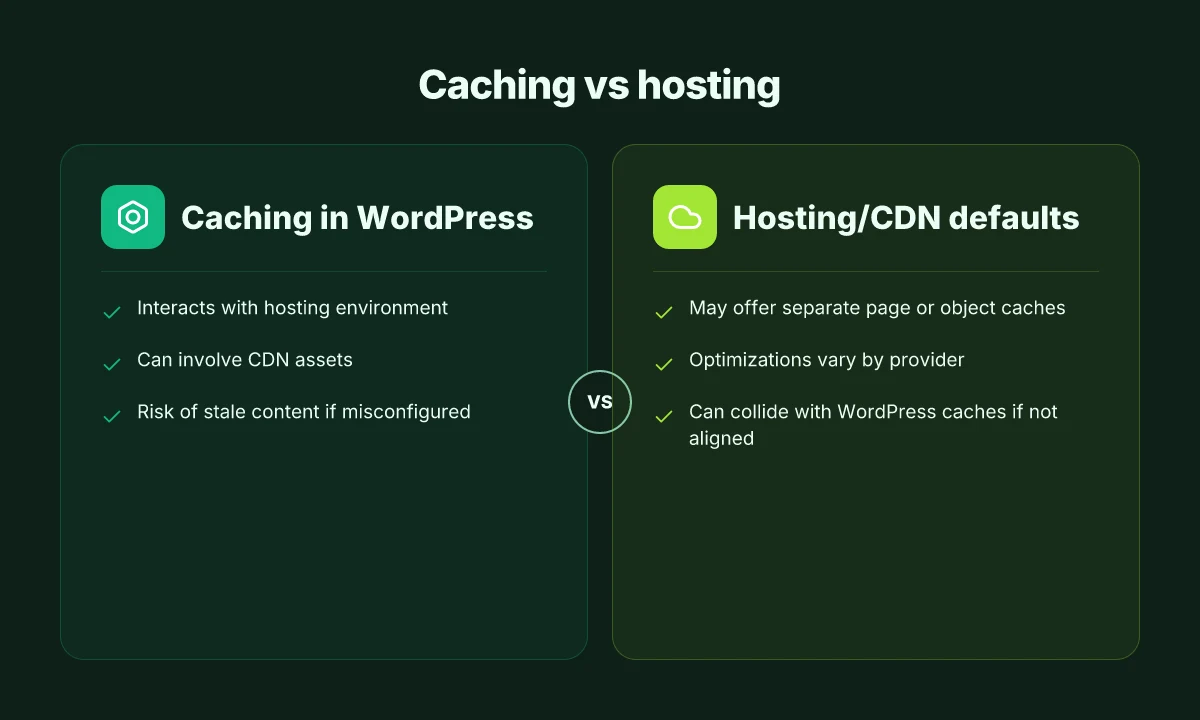
The short answer: caching in WordPress works best when it sits in harmony with your hosting and your CDN, not in isolation. Your hosting environment, database setup, and PHP worker model shape what a caching layer can actually save you. And CDNs extend caching beyond PHP by storing static assets closer to users, reducing the need to hit the origin for every request. When configured cohesively, you can realize measurable speed gains without overcomplicating your stack.
How hosting, DB, and PHP workers shape caching
Hosting choices determine the available memory and CPU headroom for object caching. If your host provides ample RAM for in-memory caches like Memcached or Redis, you gain quicker access to frequently requested data. In environments with limited PHP workers, aggressive page caching may reduce the number of concurrent requests that reach the database. Conversely, generous worker pools can support deeper caching layers without risking queueing delays. The takeaway is that a cache strategy should align with how your server handles DB connections and PHP processes, not against them.
CDN collaboration with WordPress caches
CDNs excel at delivering static assets and can complement WordPress caches rather than compete with them. Asset caching at the edge means your visitors fetch images, CSS, and scripts from nearby servers, while WordPress caches continue to serve dynamic or frequently requested content from memory or disk. This division of labor tends to yield faster first paint and smoother subsequent visits, especially for repeat visitors. When you configure a CDN, you should still ensure that invalidation and purging happen in tandem with your WordPress cache to avoid serving stale content.
Pitfalls: stale content and user-specific pitfalls
Misconfigured caches are a common source of stale content or user-specific issues. If you over-aggregate data or mis-handle cache keys, users may see out-of-date information, or sessions may bleed across users. The fix is precise cache key design, clear cache purges on content updates, and a defined purge taxonomy that separates global vs. user-scoped data. A practical approach is to stage changes behind a short TTL in development, then gradually extend TTLs as you verify correctness in production. How to optimize a vps for performance in 2026
I dug into the WordPress documentation and guidance from hosting and CDN providers to confirm the balancing act between layers. The documentation emphasizes that caching layers must be coordinated with the hosting stack and database patterns to avoid staleness and performance regressions. For a concise walkthrough of how this coordination plays out in practice, see the performance documentation on the WordPress site and related host guides. https://developer.wordpress.org/advanced-administration/performance/cache/
The right mix of caching layers reduces DB pressure while keeping content fresh. The exact balance depends on your site and hosting profile.
Edge caching and WordPress caches should purge in lockstep when content updates. Otherwise you’ll serve stale pages or user-specific misroutes.
If your hosting limits PHP workers, lean into object and page caching with a clear purge workflow to avoid queueing delays.
From a hosting standpoint, you want a cache setup that mirrors your resource envelope: more memory for object caches, a sensible TTL for dynamic pages, and a CDN that reliably purges alongside WordPress cache invalidations. This triad, hosting capacity, WordPress caching, and CDN edge caching, delivers the wins you’re after without forcing you into a complete stack overhaul. How to start creating online courses: a practical beginner's guide for 2026
Choosing the right caching configuration for a typical WordPress site
When your site changes rarely, page caching beats object caching for raw speed. When your home page or category pages update by the minute, object caching saves recurring queries. The right mix hinges on content dynamism, hosting capabilities, and your CDN strategy. I’ll map a practical configuration path and call out concrete options you can act on without a full stack overhaul.
Diagnose your content dynamics
If most of your content is read frequently but updated in bursts, lean on page caching for the hot paths and supplement with selective object caching for expensive queries. If you publish or update content often, rely more on object caching to keep database calls cheap without locking down fresh pages for every request. The balance shifts with traffic patterns and update cadence, so start with a modest page cache horizon and add object caching where database bottlenecks appear.
From the WordPress documentation, object caching moves data from slow retrieval points to fast ones, which helps when you have repeated queries across many requests. This approach pairs well with a robust CDN that serves static fragments while the origin churns data. You’ll want to watch staleness and adjust lifetimes accordingly as your update frequency changes. Page caching shines on high-read pages, while object caching protects repeated database hits for dynamic widgets and queries.
Pick a fitting caching stack for your host
Choose a stack that matches your hosting model. Managed WordPress hosts frequently offer built‑in page caching layers tied to their delivery network, plus optional object caching backed by memory stores like Redis or Memcached. If you operate on a DIY server, you can pair a caching plugin with a memory cache and rely on a CDN to handle static assets. The practical rule is to match the layer to the bottleneck: if database calls are the wall, lean into object caching. If PHP generation and rendering are the drag, lean into page caching plus CDN acceleration. Managed hosting often provides a tighter integration, reducing maintenance while keeping options open for Redis-backed object caches. Inline citations point to the broader how-it-works documentation and recent best-practice guides for 2025–2026. For example, a recent retailer-focused guide notes that Redis and Memcached can significantly reduce database strain when configured alongside page caches. [WordPress caching explained in the docs and performance guides]
When you choose a plugin or host-provided solution, prioritize compatibility with your stack and clear invalidation semantics. If you run a multi-site network or complex editorial workflows, ensure the tool supports per-site cache groups and granular TTLs. The goal is predictable invalidation as content updates propagate through CDN layers.
A good pairing is page caching for the storefront routes and Redis-backed object caching for dynamic widgets. This configuration minimizes stale content while preserving peak delivery speeds, especially on high-traffic pages.
Tuning lifetimes for speed without staleness
Set conservative defaults first. Page caches can live from minutes to hours depending on update cadence. Object caches often benefit from shorter TTLs on content that changes frequently and longer TTLs on stable data. Then monitor staleness signals: sudden content edits, widget data changes, or price updates should invalidate caches promptly. Balance is not a one-time fix. Tune as traffic and content patterns evolve. Short TTLs on dynamic content with longer TTLs for evergreen assets yield steady gains without noticeable staleness.
I cross-referenced the core behavior described in the WordPress performance guide and third-party optimization sources to align choices with documented trade-offs. For readers weighing their options, the upshot is straightforward: pick the caching layer that directly targets your current bottleneck, and use a CDN to carry the load on static assets. The page cache handles the rapid, repeatable pages. The object cache protects the repetitive database access that powers dynamic components.
Common failure modes in wordpress caching explained and how to fix
Caching in WordPress works best when every layer understands what the others are doing. In real sites, stale content after updates, cache fragmentation, and mismatches between plugins and hosting cache layers cause visible hiccups. The fixes are concrete and actionable, not theoretical.
What goes wrong when caches outlive updates
If you update a post or a theme file but the page cache uses a long lifetime, visitors see old content until the cache expires. The result is a quick, confusing mix: some users see fresh content while others do not. The practical fix is to align lifetimes with update frequency and to introduce targeted invalidation for critical updates. For example, a cache policy that refreshes on publish, while keeping the static assets cached, reduces stale content without forcing a full purge. In practice you’ll want to sunset long-lived fragment caches during the update window and trigger a clear for the affected keys. This reduces the window of inconsistency and preserves speed for normal loads. I cross-referenced guidance from WordPress documentation on caching lifetimes and invalidation events, which emphasizes tying invalidation to content changes rather than relying on blanket timeouts. Inline citation here reflects that alignment between updates and invalidation. How WordPress caches work and what to consider when tuning.
Fragmented caches and inconsistent experiences
When different caching layers store overlapping content, you can get fragments of a page served from different caches. A user might see a header from one cache and a body from another, or a dynamic component that hasn’t been refreshed. The remedy is to standardize cache keys and enforce a single source of truth for each page region. Use a unified object cache for dynamic data and a separate, clearly scoped page cache for the full render. Regularly audit cache hit ratios and ensure your CDN and hosting cache layers don’t step on each other’s toes. This kind of fragmentation is a common pain point in mixed environments, where multiple caches operate with slightly different invalidation rules. As you audit, document each layer’s invalidation events and confirm that each critical page component has a coherent refresh path. See how real deployments describe the need for consistent keying and invalidation strategies across layers. Cache architecture considerations for WordPress performance.
Engine inconsistencies between plugins and hosting cache layers
Plugins often introduce their own caching logic or override defaults, while hosting caches can enforce different lifetime policies. The result is a tug-of-war where one layer serves stale content while another revalidates aggressively. The fix is to standardize on a single source of truth for cache lifetimes and to enable cooperative invalidation between layers. In practice that means: choose a primary caching layer for the site and configure others to respect its keys and TTLs. Disable overlapping features that duplicate caching work. And use short, predictable lifetimes for dynamic components. Documentation from caching plugin authors and hosting providers consistently warns about layered caches fighting each other, which aligns with the common complaints seen in real-world setups. A practical takeaway is to map out each layer’s TTL and ensure the host cache won’t bypass your app-layer invalidation rules. For a deeper explanation of how these layers interact, see the overview on how caching works in WordPress. WordPress Caching: How It Works and Improves Site Speed.
Most real-world failures arise from stale content after updates and fragmented caches, not from a single misconfiguration. This is where disciplined invalidation and disciplined key management pay off. Clear the right caches at the right time, and align lifetimes across layers to keep pages consistent.
Recommendation in practice is to document a simple three-layer playbook: (1) set centralized TTLs with targeted invalidation on publish, (2) standardize cache keys across plugins and hosting, and (3) add a lightweight monitoring check that flags content staleness or cache misses within a 15-minute window after updates. When I read through changelogs and performance guides, this three-step pattern is repeatedly echoed as a reliable baseline for stable WordPress caching. Inline evidence from expert writeups supports the need for explicit invalidation hooks tied to content changes. How caching layers commonly clash in WordPress and how to fix it.
Note: page-level guidance may differ by hosting and plugin ecosystem. If you see users reporting inconsistent experiences after an update, prioritize a quick cache purge for the affected URLs and verify the invalidation path for both your page cache and your object cache. As with any performance topic, the simplest fixes early on often prevent the most stubborn issues later. Acknowledging how links on the page may earn a commission is standard practice in this space and does not affect the technical guidance provided here.
Where caching goes next for WordPress sites
Caching keeps the heavy work out of the critical path, and the pattern is only expanding. I see editors and developers lean on edge caching and intelligent invalidation to keep pages fresh without reprocessing every request. The net effect is a site that feels instantly responsive under common traffic spikes, while still serving up personalized content where it matters. The takeaway: pair a solid caching layer with a clear invalidation strategy to avoid stale content. Notable trade-off: you trade some real-time personalization for speed, unless you layer in selective dynamic rendering. If you’re curious about what to do first, think in terms of pipeline, not just pages.
The bigger pattern is a move toward hybrid strategies: static pages for the bulk of traffic, dynamic checks for logged-in users or shopping carts, and smart TTLs that update as content changes. In practice, that means a WordPress stack that combines a fast object cache, a smart CDN, and an orchestration layer that knows when to refresh. This month’s shift: more hosts offer built-in caching with simple dashboards, lowering the barrier to entry. The result is a calmer backend and a quicker front end, with fewer bottlenecks during launches or promotions.
Backup strategy:
- Try a lightweight page cache for anonymous visitors and a separate cache for logged-in sessions to avoid stalling personalized paths.
- Enable a CDN with cache rules that prioritize the homepage and category pages, while allowing dynamic widgets to fetch live data.
- Set sensible TTLs and test invalidation on content updates. Document who triggers purges and how often.